
Delivery SquashTM 12.0, improved automated test results and better sprint management
The delivery of SquashTM contains the following features:
-
Reporting of automated test results executed within a CI/CD pipeline
-
More comfort for testers:
- Sprints and sprint groups: a new dashboard and interactive charts
- Sprints: management in the API and synchronization configuration
- New distinction between assignee and executor in execution plans
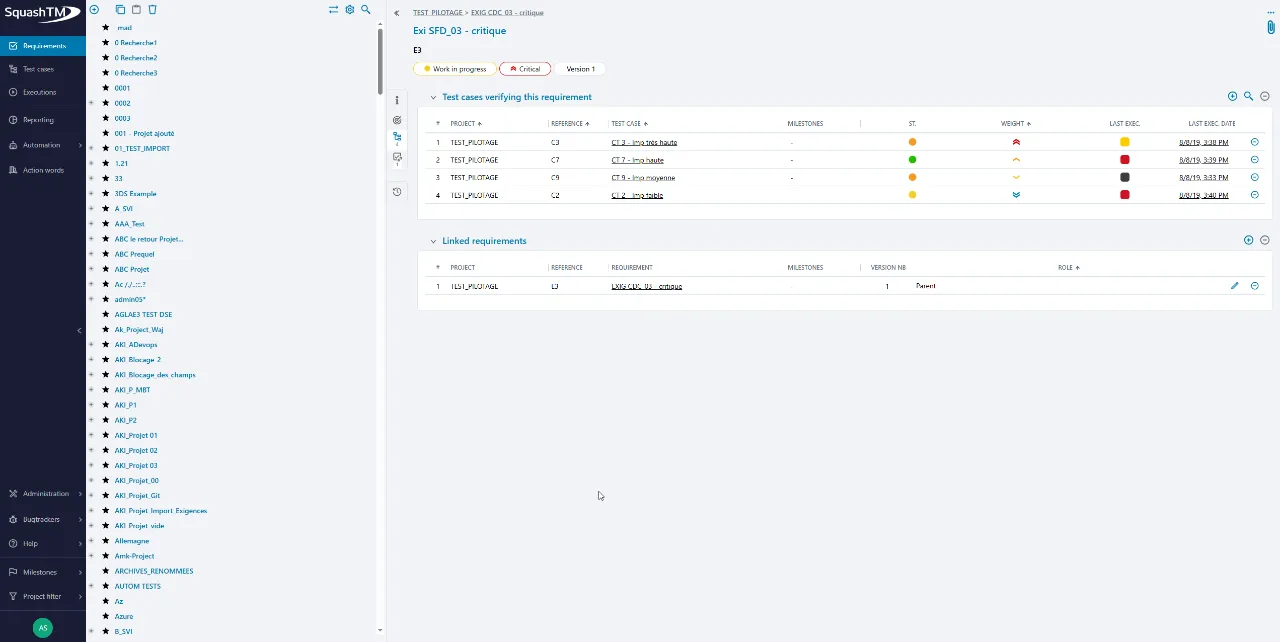
- Last execution date in requirements
-
Automatic rerun of failed tests*
-
Feature removals
-
Deprecated features
The full list of new features and bug fixes is available on SquashTM 12.0.
Reporting of automated test results executed within a CI/CD pipeline
- SquashTM Server: Requires the Community offer for the reporting of tests results and Premium offer for the reporting of assertions.
- SquashTM Cloud: Requires the Ultimate offer for the reporting of tests results and assertions.
A newREST API endpoint allows the reporting of automated test results executed within a CI/CD pipeline. This endpoint enables the publication, in a single HTTP call, of the execution status of multiple tests belonging to the same execution plan.
It also allows you to specify execution duration, test step statuses, attach files, and include error messages (this feature is available with the Premium license).
Sprints and sprint groups: a new dashboard and interactive charts
New Dashboard for sprint Groups
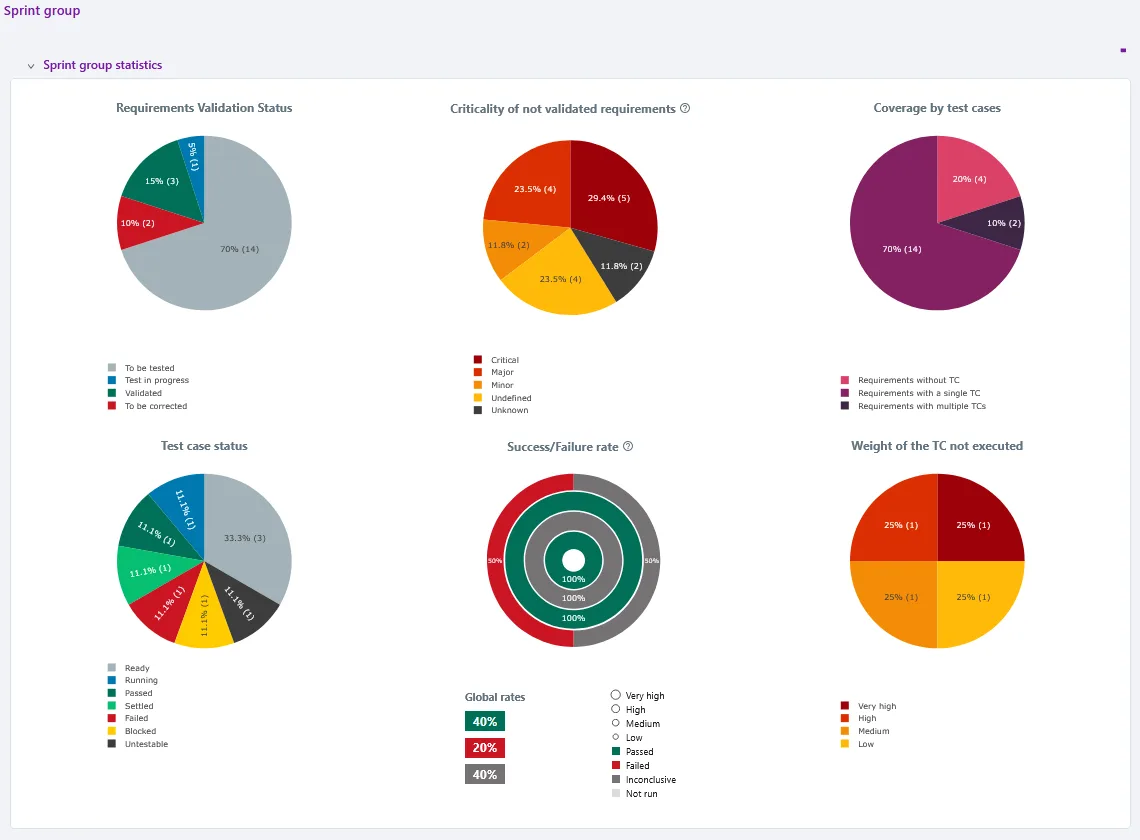
A new dashboard is now available for sprint Groups. It provides a consolidated view of the statistics from all sprints within the group and allows for a more detailed analysis of tests and requirements.
The dashboard includes the following charts:
- “Coverage by test cases”
- “Test case status”
- “Success/Failure rate”
- “Importance of never-executed test cases”
- “Criticality of unvalidated requirements”
- “Requirements validation status”
Interactive charts in sprints and sprint groups
It is now possible to directly interact with certain default charts in the sprint and sprint group dashboards. Clickable portions automatically redirect the user to the “Search execution plan items” page, with the appropriate criteria pre-filled depending on the selected part of the chart.
The charts concerned are:
- Test case status
- Success/Failure rate
- Importance of never-executed test cases
Sprints: management in the API and synchronization configuration
Sprint management in the API
Sprints are now fully supported in the API. It is possible to create, view, and manage sprint-related information directly through the available endpoints, making their integration and synchronization with external tools much easier.
Sprint Synchronization Configuration in Xsquash4Jira API
It is now possible to configure sprint synchronization directly through the Xsquash4Jira API. New endpoints allow users to create, view, edit, or delete a sprint synchronization configuration.
New distinction between assignee and executor in execution plans
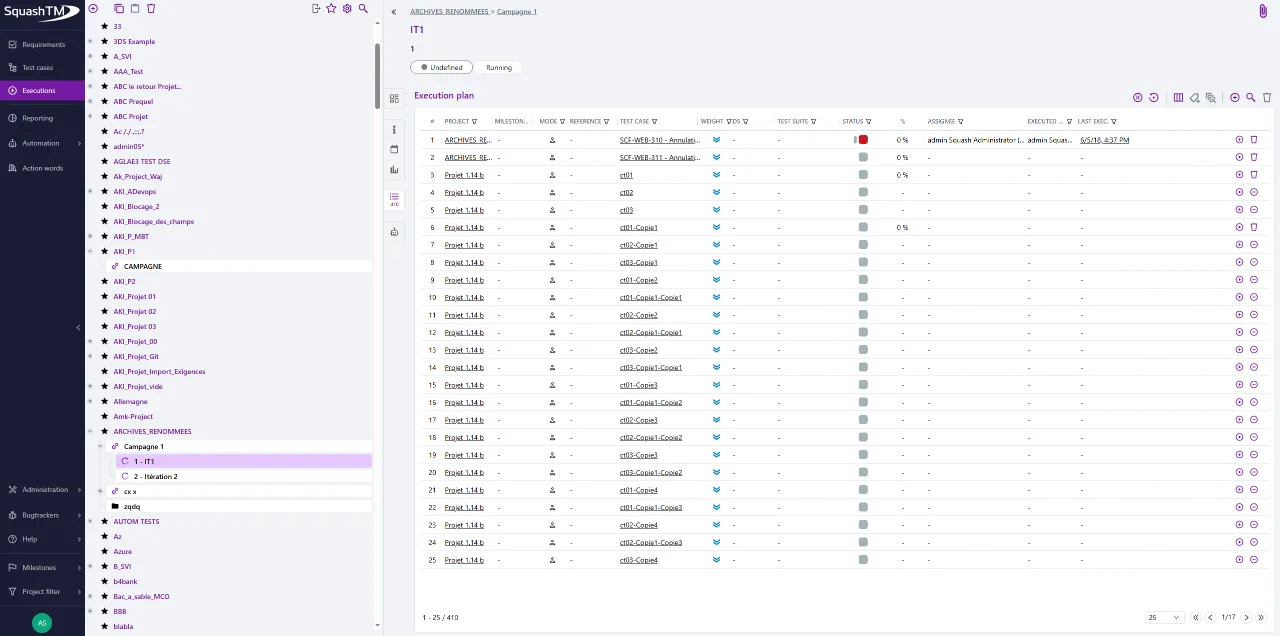
Two separate columns are now displayed in execution plans to better differentiate roles:
- The “Assignee” column shows the person to whom the test case has been assigned.
- The “Executed by” column displays the login of the user who performed the execution.
When a test case has not been assigned, the “Assignee” column remains empty. This enhancement provides greater clarity and more accurate tracking of responsibilities related to test case execution.
Last execution date in requirements
In the “Test cases verifying this requirement” block, the date and time of the last execution are now displayed in addition to the associated status.
A new column has been added to the table to make it easier to track the tests linked to a requirement. When the test case has never been executed, a dash ”-” is displayed instead.
The date is also clickable: it redirects directly to the detail of the corresponding execution (or to the exploratory session in the case of an exploratory test).
For executions performed with Fastpass, the date is visible but not clickable.
This enhancement is available for all requirement types: classic, synchronized, and high-level.
Automatic rerun of failed tests*
Requires the SquashTM Ultimate offer.
With the 6.1.0 version of SquashTM Orchestrator (Ultimate license), the retryer plugin allows you to automatically rerun failed tests at the end of an execution. Ideal for handling flaky tests, it’s enabled through a teardown hook and offers several configuration options (max-retry, scope, failure-status).
See the documentation for more information.
* with the upcoming release of SquashTM Orchestrator version 2025-10.
Feature removals
- The plugin for Jenkins is no longer delivered. Jenkins must now use opentf-ctl.
- The handling of Allure reports has been removed.
- Docker Image - Upgrade
Warning: To migrate from SquashTM 8.1 (or earlier) to SquashTM 12.0.0, you must go through an intermediate version SquashTM 9.X. Direct upgrade is not supported.
Deprecated features
The following features are deprecated and will be permanently removed from Squash in the versions or on the dates indicated:
-
SquashTM 15.0 (August 2026): Custom templates for campaign and iteration reports, created from a default template before SquashTM 11, contain tags that will no longer be supported. These tags will be removed.
-
Mid-2026: Login with SHA-1 hashed passwords will not work anymore. Originally planned for 13.0, this deprecation was postponed to facilitate the transition and allow time for the automatic migration mechanisms to work.
Basic authentication for REST API will not be supported anymore.
Jira 9.X support will cease with the end of support for this version by Atlassian.
For more information and further deprecations, please visit deprecation details.